


10-18-2025, 07:13 PM
LootSense 1.0.0


------------------------------------------------------------
? Overview
LootSense is a smart loot management addon for World of Warcraft 1.12.1 (Vanilla) that helps you automatically keep, vendor, or delete specific items.
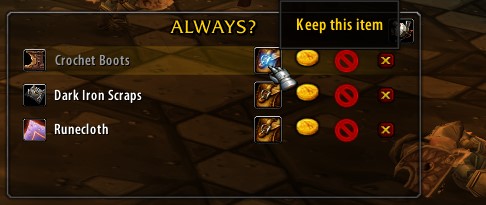
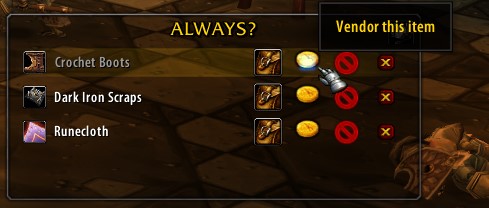
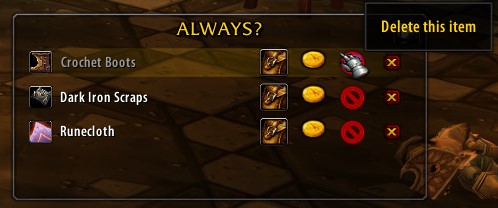
When you loot an item, LootSense opens a small decision frame that gives you options:
Always Keep, Always Vendor, Always Delete, or Ignore.
Choosing *Ignore* means the addon will forget the item until you encounter it again.
Next time you loot the same item, LootSense performs the chosen action automatically — saving you time, bag space, and sanity.
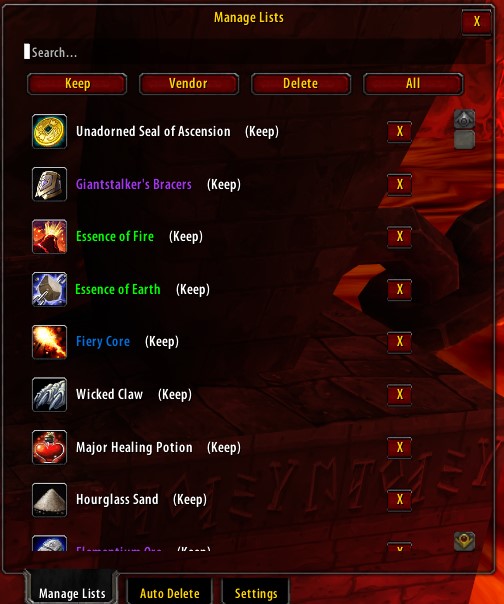
If you change your mind, you can open the settings via the minimap button:

------------------------------------------------------------
⚠️ Warning
LootSense can automatically delete or sell items based on your configuration.
Use it carefully — automated deletion is permanent and cannot be undone.
Before enabling auto-delete, double-check your lists to ensure no valuable items will be lost.
If you want to pause all automation, use the “Pause LootSense” option in settings.
------------------------------------------------------------
?️ Installation
1. Download LootSense:
https://github.com/pumpan/LootSense/releases
2. Extract Files:
Place the folder in your WoW AddOns directory:
3. Enable LootSense:
Start WoW and enable the addon from the AddOns menu at the character selection screen.
------------------------------------------------------------
✨ Features
------------------------------------------------------------
? Usage
1. Loot an item → LootSense shows buttons:
? Keep | ? Vendor | ? Delete
2. Click a button — LootSense remembers your choice.
3. Next time that item drops, it’s auto-handled.
Access settings via minimap button, `/ls list`, or from the loot frame menu:
------------------------------------------------------------
? Example Workflow
Next time you loot them, LootSense handles them instantly.
------------------------------------------------------------
?️ Changelog
LootSense 1.0.0
------------------------------------------------------------
? License
This project is licensed under the MIT License.
See LICENSE file on GitHub.
------------------------------------------------------------
? Contact
For feedback or bug reports:
The Forum, Discord or in game, also github:
https://github.com/pumpan/LootSense/issues
------------------------------------------------------------
? Overview
LootSense is a smart loot management addon for World of Warcraft 1.12.1 (Vanilla) that helps you automatically keep, vendor, or delete specific items.
When you loot an item, LootSense opens a small decision frame that gives you options:
Always Keep, Always Vendor, Always Delete, or Ignore.
Choosing *Ignore* means the addon will forget the item until you encounter it again.
Next time you loot the same item, LootSense performs the chosen action automatically — saving you time, bag space, and sanity.
If you change your mind, you can open the settings via the minimap button:
------------------------------------------------------------
⚠️ Warning
LootSense can automatically delete or sell items based on your configuration.
Use it carefully — automated deletion is permanent and cannot be undone.
Before enabling auto-delete, double-check your lists to ensure no valuable items will be lost.
If you want to pause all automation, use the “Pause LootSense” option in settings.
------------------------------------------------------------
?️ Installation
1. Download LootSense:
https://github.com/pumpan/LootSense/releases
2. Extract Files:
Place the folder in your WoW AddOns directory:
Code:
World of Warcraft/Interface/AddOns/LootSense3. Enable LootSense:
Start WoW and enable the addon from the AddOns menu at the character selection screen.
------------------------------------------------------------
✨ Features
- ? Smart Loot Filtering – Automatically manage items with Keep, Vendor, or Delete.
- ? Per-Character Saved Preferences – Each character remembers your decisions.
- ⚙️ Minimal UI – Lightweight and clean design integrated into the vanilla interface.
- ? Auto Vendor Integration – Automatically sells vendor-marked items.
- ?️ Auto Delete Functionality – Instantly removes trash items when looted.
- ? Clean Frame Logic – Frame disappears automatically when all items are handled.
------------------------------------------------------------
? Usage
1. Loot an item → LootSense shows buttons:
? Keep | ? Vendor | ? Delete
2. Click a button — LootSense remembers your choice.
3. Next time that item drops, it’s auto-handled.
Access settings via minimap button, `/ls list`, or from the loot frame menu:
------------------------------------------------------------
? Example Workflow
- Loot Broken Fang → ? Delete
- Loot Worn Shortsword → ? Vendor
- Loot Runecloth → ? Keep
Next time you loot them, LootSense handles them instantly.
------------------------------------------------------------
?️ Changelog
LootSense 1.0.0
- Initial Release
- Core loot logic implemented
- Auto vendor & delete
- Per-character saved data
- Lightweight performance
------------------------------------------------------------
? License
This project is licensed under the MIT License.
See LICENSE file on GitHub.
------------------------------------------------------------
? Contact
For feedback or bug reports:
The Forum, Discord or in game, also github:
https://github.com/pumpan/LootSense/issues